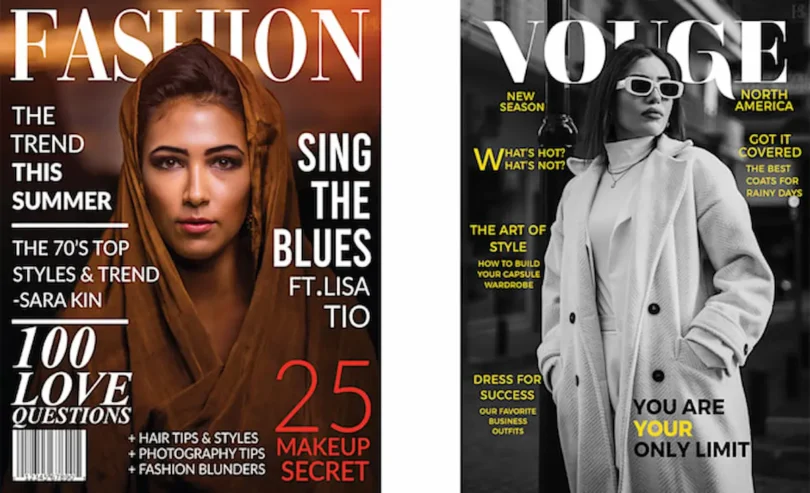

Magazine cover design is one of the most important parts of creating a successful magazine. Whether you are designing a fashion magazine, lifestyle publication, business magazine, or digital magazine, the cover is the first thing readers notice. A beautiful and professional cover can grab attention, create curiosity, and encourage people to explore the content inside.
If you are planning to design your own magazine cover, you do not need to be a professional designer to get started. With the right layout, colors, fonts, images, and design tools, you can create an attractive cover that looks professional and communicates your magazine’s theme.
What Is Magazine Cover Design?
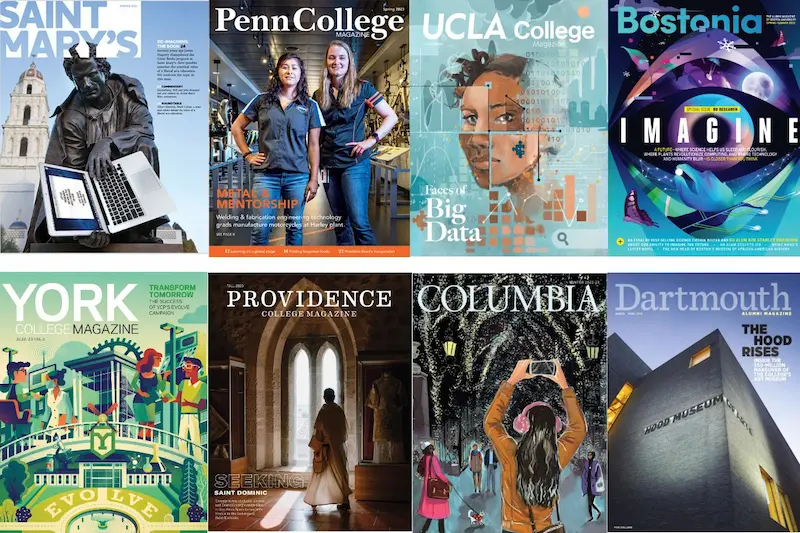
Magazine cover design is the process of creating the front page of a magazine using images, headlines, typography, colors, and other visual elements. Its main purpose is to represent the magazine’s content and attract the attention of potential readers.
A magazine cover usually includes:
- Magazine name or logo
- Main cover image
- Main headline or featured story
- Supporting headlines
- Publication date
- Issue number
- Barcode or price for printed magazines
Each element has a specific purpose. For example, the magazine title helps readers recognize the publication, while the main image creates a strong visual impression.
Why Is Magazine Cover Design Important?
A magazine cover is more than just an attractive front page. It plays an important role in building the magazine’s identity and influencing readers’ decisions.
Here are some reasons why good magazine cover design matters.
1. Creates a Strong First Impression
Readers often judge a magazine by its cover before deciding whether to read it. An attractive design immediately creates interest and encourages people to explore the magazine.
2. Builds Brand Identity
Using consistent colors, fonts, logos, and layouts helps readers recognize your magazine. Over time, these visual elements become part of your publication’s identity.
3. Attracts the Target Audience
Different magazines attract different audiences. A fashion magazine may use stylish photography and modern typography, while a business magazine may prefer a clean and professional appearance.
4. Highlights Important Stories
The main headline tells readers what makes a particular issue special. Supporting headlines can introduce other interesting topics covered inside the magazine.
Essential Elements of a Good Magazine Cover
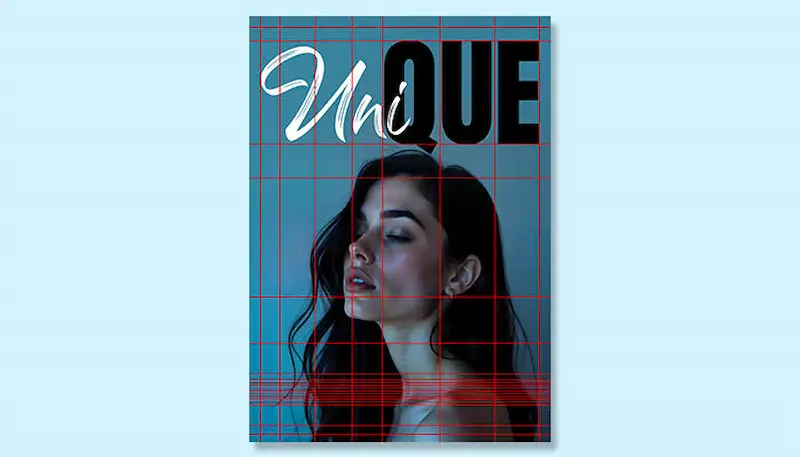
Before starting your design, it is important to understand the basic elements that make a magazine cover look professional.
Magazine Title or Masthead
The magazine title is usually placed at the top of the cover. It should be easy to read and visually recognizable.
Choose a font that matches your magazine’s personality and maintain consistent branding across different issues.
Main Cover Image
The main image is often the most noticeable part of a magazine cover. It should be high-quality, relevant to the magazine’s topic, and visually appealing.
For example, a fashion magazine might feature a model, while a technology magazine could use an image related to modern gadgets or innovation.
Main Headline
The main headline highlights the most important story in the issue. Keep it short, interesting, and easy to understand.
Supporting Headlines
Supporting headlines provide information about other articles inside the magazine. Avoid adding too much text because a crowded cover can look confusing.
Typography and Fonts
Typography helps communicate the magazine’s style. You can combine a bold font for headlines with a simple font for smaller text.
However, using too many different fonts can make the design look unprofessional.
Colors and Background
Colors influence the overall appearance of your cover. Choose a color combination that matches your magazine’s theme and provides enough contrast between the text and background.
Popular Types of Magazine Cover Designs
There are many magazine styles, and each one has its own visual approach.
1. Fashion Magazine Cover
Fashion magazine covers often feature professional photography, stylish models, elegant typography, and attractive color combinations. The main purpose is to showcase fashion trends, beauty ideas, and new styles.
2. Technology Magazine Cover
Technology magazine covers focus on gadgets, artificial intelligence, software, digital innovation, and modern technology. These designs often use futuristic colors and creative graphics.
3. Business Magazine Cover
Business magazine covers generally use professional images, clean layouts, strong headlines, and simple color schemes. They often highlight business leaders, financial developments, and industry trends.
4. Travel Magazine Cover
Travel magazines use beautiful destinations, natural landscapes, and eye-catching photography to inspire readers. Their covers often highlight popular tourist destinations and travel experiences.
5. Food Magazine Cover
Food magazine covers highlight delicious dishes, recipes, ingredients, and attractive food photography. Bright colors and creative typography can make these covers more appealing.
You may also like to read this:
Nubia Magazine Vote 2026 Most Beautiful Woman
Sunday Magazine Guide: Stories, Entertainment and Lifestyle
Magazine Cover Page: Design Ideas, Tips, and Examples
Kurukshetra Magazine PDF, Benefits and Study Guide
Magazine Design: Tips, Ideas, Tools, and Complete Guide
How to Create a Professional Magazine Cover Design
Creating a magazine cover becomes easier when you follow a proper design process. Here are some simple steps you can use.
Step 1: Choose Your Magazine Topic
First, decide what type of magazine you want to create. It could be related to fashion, technology, health, business, travel, education, or lifestyle.
Your topic will help you choose the right images, colors, and overall design style.
Step 2: Select a High-Quality Image
Choose an image that represents your main story. Make sure the image has good resolution and enough space for the magazine title and headlines.
Avoid blurry, poorly cropped, or unrelated images.
Step 3: Choose the Right Fonts
Select fonts that are easy to read. Use bold typography for the magazine name and main headline, while smaller supporting text should remain simple.
Step 4: Create an Attractive Layout
Arrange the title, main image, and headlines carefully. Make sure important information is visible without making the cover look overcrowded.
Step 5: Select a Suitable Color Scheme
Choose two or three main colors that work well together. Make sure the text stands out against the background.
Step 6: Review and Finalize Your Design
Before publishing, check spelling, image quality, alignment, spacing, and readability. If you are creating a printed magazine, also confirm the correct page dimensions, bleed, and print resolution.
Best Tools for Magazine Cover Design
You do not need expensive software to create a professional magazine cover. Several design tools offer useful features for beginners and experienced designers.
1. Canva
Canva is a beginner-friendly design platform with ready-made magazine cover templates, fonts, images, and editing tools. You can customize existing templates or create a new design from scratch.
2. Adobe Photoshop
Adobe Photoshop is useful for professional photo editing, image manipulation, background removal, and creative cover designs. It offers advanced features for users who want more control over their designs.
3. Adobe InDesign
Adobe InDesign is designed for professional publishing and is particularly useful for magazines, brochures, and multi-page layouts. It helps designers organize text and images professionally.
4. Adobe Express
Adobe Express offers simple design features and templates that help users create attractive magazine covers quickly. It is a convenient option for beginners and people who need quick results.
Magazine Cover Design Ideas for Inspiration
If you are not sure where to start, exploring different design ideas can help you find the right direction.
Here are some creative ideas worth considering:
Minimalist Magazine Cover
Use a simple background, one high-quality photograph, and limited text. This style works well for fashion, lifestyle, and luxury magazines.
Modern Editorial Magazine Cover
Combine bold headlines, creative typography, and professional photography. This approach is suitable for business, technology, and news publications.
Colorful Magazine Cover
Use bright colors, creative graphics, and attractive typography to make your cover stand out. This style can work well for entertainment and children’s magazines.
Black and White Magazine Cover
A black-and-white design creates a classic and elegant appearance. It is especially useful for photography, art, and premium editorial publications.
Common Magazine Cover Design Mistakes to Avoid
Even a beautiful image cannot make a cover successful if the layout is poorly organized. Try to avoid these common mistakes:
- Using too many fonts and colors.
- Adding too many headlines.
- Choosing low-quality images.
- Making the magazine title difficult to read.
- Using text colors that blend into the background.
- Ignoring spacing and alignment.
- Adding unnecessary design elements.
- Forgetting to check the final print dimensions.
Remember, a good magazine cover should look attractive while making the information easy to understand.
Magazine Cover Design Size and Format
Choosing the correct size is important, especially if you plan to print your magazine.
Some common magazine sizes include:
| Magazine format | Approximate dimensions |
| A4 | 8.27 × 11.69 inches |
| US Letter | 8.5 × 11 inches |
| A5 | 5.83 × 8.27 inches |
For digital magazines, you can also create custom dimensions depending on the platform where you plan to publish.
For professional printing, remember to include bleed and keep important text inside the safe margin. A high-resolution PDF is commonly used for print delivery.
Tips for Making Your Magazine Cover Stand Out
If you want your magazine cover to look more professional, keep these practical tips in mind:
- Use one strong main image that represents your topic.
- Make your magazine title clear and recognizable.
- Highlight one important headline instead of giving every headline equal attention.
- Maintain a consistent color scheme.
- Use readable typography.
- Leave enough empty space around important elements.
- Study successful magazine covers for inspiration.
- Make sure your design matches your target audience.
A little attention to these details can make a big difference in the final result.
Conclusion
Magazine cover design is an important part of creating a successful publication. It helps attract readers, communicate the magazine’s theme, and build a recognizable brand identity. Whether you are designing a fashion, technology, business, food, or travel magazine, the right combination of images, fonts, colors, and headlines can make your cover more appealing.
You can start with simple tools like Canva or Adobe Express and gradually explore advanced software such as Photoshop and InDesign. Focus on a clean layout, quality images, and readable text. With practice and creativity, you can create professional magazine covers that capture attention and make readers interested in what’s inside.
Frequently Asked Questions About Magazine Cover Design
1. What is magazine cover design?
Magazine cover design is the process of creating an attractive front page using images, headlines, typography, colors, and other visual elements to represent a magazine’s content.
2. Why is magazine cover design important?
Magazine cover design is important because it creates the first impression, attracts readers, highlights important stories, and helps build a recognizable brand identity.
3. Which software is best for magazine cover design?
Canva, Adobe Photoshop, Adobe InDesign, and Adobe Express are popular tools for creating professional magazine covers. Canva is particularly suitable for beginners.
4. How can beginners create a magazine cover?
Beginners can start by choosing a magazine topic, selecting a high-quality image, adding a title and headlines, choosing suitable fonts, and arranging everything in a clean layout.
5. What are the main elements of a magazine cover?
The main elements include the magazine title, cover image, main headline, supporting headlines, publication date, issue number, and barcode for printed magazines.