
Introduction
Magazine design is the process of creating an attractive, organized, and easy-to-read magazine that captures readers’ attention. Whether you want to create a fashion magazine, lifestyle publication, business magazine, or digital magazine, the right design can make your content more engaging and professional.
A successful magazine is not just about writing interesting articles. It also requires appealing layouts, readable fonts, suitable colors, high-quality photographs, and a consistent visual style. If you are planning to create your own magazine, understanding these basic elements will help you develop a publication that looks professional and keeps readers interested.
What Is Magazine Design?
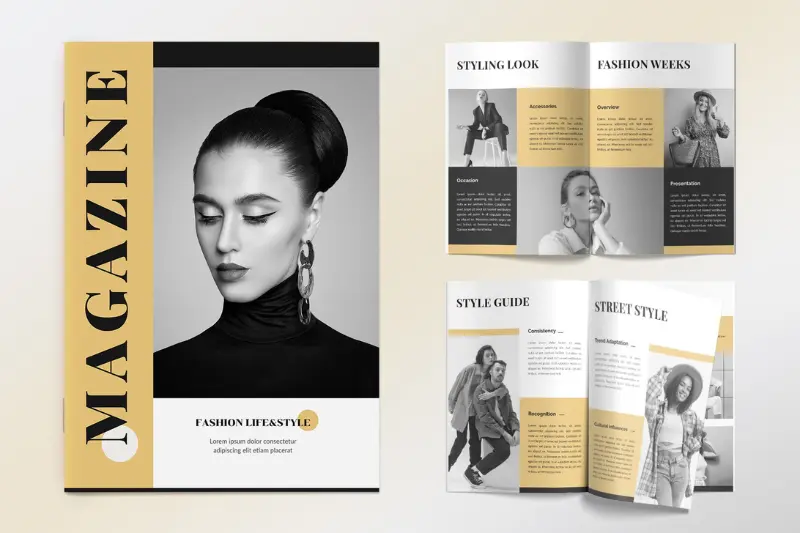
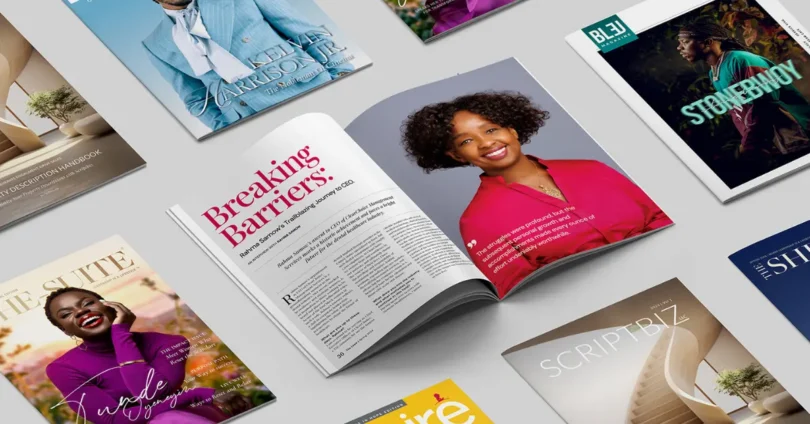
Magazine design refers to the visual arrangement of text, headlines, photographs, illustrations, and other elements throughout a magazine. It includes designing the front cover, table of contents, article pages, advertisements, and back cover.
The main purpose of magazine design is to present information in an attractive and organized way. A well-designed magazine should reflect its subject, appeal to its target audience, and make the content easy to read.
For example, a fashion magazine may use bold headlines, stylish typography, and creative photography. In contrast, a business magazine may focus on professional layouts, simple colors, charts, and informative articles.
Why Is Magazine Design Important?
Magazine design plays an important role in how readers experience a publication. Even if your articles contain valuable information, a confusing layout or unattractive cover may discourage people from reading them.
Here are some important benefits of good magazine design.
1. Attracts Readers’ Attention
The cover is usually the first thing readers notice. An attractive cover with a strong headline, suitable colors, and a clear main image can encourage people to explore the magazine.
2. Improves Readability
A well-organized layout makes it easier for readers to follow articles. Appropriate font sizes, paragraph spacing, headings, and margins help create a comfortable reading experience.
3. Builds Brand Identity
Consistent colors, fonts, logos, and layouts help readers recognize your magazine. Over time, these elements can establish a distinctive identity for your publication.
4. Makes Content More Engaging
Photographs, illustrations, infographics, and highlighted quotations make magazine pages more interesting. These elements can also help explain complex information in a simple way.
5. Creates a Professional Appearance
A carefully designed magazine looks polished and trustworthy. This is especially important for businesses, publishers, educational institutions, and organizations that want to reach a specific audience.
Essential Elements of Magazine Design
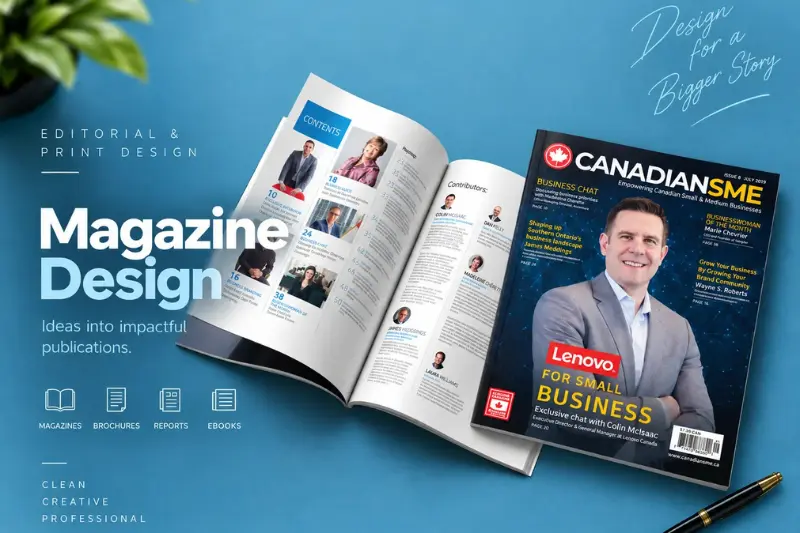
Before creating a magazine, you should understand the main elements that contribute to an effective design.
Magazine Cover Design
The cover is one of the most important parts of a magazine because it introduces the publication to readers. It should communicate the magazine’s subject and create interest without looking overcrowded.
A good magazine cover typically includes:
- Magazine name or logo
- Main headline
- Supporting headlines
- Publication date or issue number
- A suitable color scheme
- A strong visual focus
Keep the cover organized and make sure the most important information stands out.
Typography and Fonts
Typography affects both the appearance and readability of a magazine. Using too many fonts can make the design look inconsistent, so it is usually best to select two or three complementary typefaces.
For example, use a bold font for headlines and a simple, readable font for the main article text. You can also use a decorative font for selected elements when it suits the magazine’s style.
Colors and Visual Style
Colors help establish the mood of a publication. Bright colors may suit entertainment or children’s magazines, while neutral colors often work well for business, architecture, and luxury publications.
Choose a small group of complementary colors and use them consistently throughout the magazine.
Images and Photography
Photographs and illustrations make magazine pages more visually appealing. Choose images that relate directly to the article and support its message.
For printed magazines, use high-resolution images suitable for the final print size. For digital publications, optimize image sizes to maintain good quality without making pages unnecessarily slow to load.
Page Layout and Grid Systems
A grid system helps organize text, images, captions, and headlines. It creates consistency across pages while allowing enough flexibility for different types of articles.
For example, a feature article might use two columns of text, while an interview could include photographs, quotations, and shorter text sections.
White Space
White space refers to the empty areas around text and images. It helps prevent pages from looking crowded and allows readers to focus on important information.
Using enough white space can make even a simple magazine layout look clean and professional.
You may also like to read this:
Vision IAS Monthly Magazine: Complete UPSC Guide
Nubia Magazine Vote 2026 Most Beautiful Woman
Sunday Magazine Guide: Stories, Entertainment and Lifestyle
Magazine Cover Page: Design Ideas, Tips, and Examples
Kurukshetra Magazine PDF, Benefits and Study Guide
Popular Types of Magazine Design
Different types of magazines require different design approaches. The best choice depends on your topic, audience, and publishing goals.
1. Fashion Magazine Design
Fashion magazines often use bold typography, stylish photography, creative layouts, and attractive color combinations. The design should highlight clothing, beauty trends, accessories, and editorial stories.
2. Business Magazine Design
Business magazines generally use clean layouts, professional fonts, organized headings, and informative graphics. Charts and infographics can help readers understand financial information, industry developments, and business strategies.
3. Travel Magazine Design
Travel magazines focus on destinations, cultures, attractions, and travel experiences. Large photographs, maps, informative captions, and organized articles help readers explore different places.
4. Lifestyle Magazine Design
Lifestyle magazines may cover food, health, beauty, home decoration, wellness, and everyday living. Their designs often combine attractive visuals with practical information and easy-to-read articles.
5. Digital Magazine Design
Digital magazines are created for computers, tablets, and smartphones. They may include clickable contents pages, interactive graphics, embedded videos, and other digital features.
A good digital magazine should also be easy to navigate and comfortable to read on smaller screens.
How to Create a Magazine Design Step by Step
If you are a beginner, you do not need to be an expert designer to get started. Following a simple process can help you organize your ideas and create a professional-looking magazine.
Step 1: Define Your Magazine’s Purpose
First, decide what your magazine will cover. It could focus on fashion, technology, education, business, food, travel, or another subject.
A clear purpose helps you choose the right writing style, colors, photographs, and page layouts.
Step 2: Understand Your Target Audience
Think about who will read your magazine. Consider their interests, age group, reading habits, and expectations.
For example, a magazine for young readers may use bright colors and energetic layouts, while a professional publication may require a more formal and structured design.
Step 3: Plan Your Content
Prepare a list of the articles, interviews, features, advertisements, and other sections you want to include.
Create a page plan before beginning the design. This will help you decide where each article belongs and how many pages you need.
Step 4: Choose the Magazine Size
Select a suitable page size according to your publication’s purpose and printing requirements. Common options include A4, A5, and custom dimensions.
For digital magazines, consider how the pages will appear on different screen sizes.
Step 5: Create the Cover
Start with the magazine name, main headline, and central visual element. Add supporting headlines only when they improve the design.
Avoid putting too much text on the cover because it can make the page look crowded and confusing.
Step 6: Design the Interior Pages
Create a consistent style for headlines, article text, captions, page numbers, and section headings.
You can use different layouts for interviews, photo stories, opinion pieces, and feature articles while maintaining the magazine’s overall identity.
Step 7: Add Images and Graphics
Choose relevant photographs, illustrations, charts, and other graphics to support your content.
Make sure you have permission to use the images and visual assets you select. Use graphics when they help readers understand the subject more clearly.
Step 8: Review and Export Your Magazine
Before publishing, proofread all articles and check the layout carefully. Make sure the text is readable, images are clear, and page elements are properly aligned.
For printing, confirm the printer’s requirements for margins, bleed, color settings, and PDF export. For digital distribution, check navigation, readability, and file size.
Best Tools for Magazine Design
Several design tools can help you create a magazine, depending on your experience and budget.
| Design tool | Best use |
| Canva | Beginner-friendly designs and ready-made templates |
| Adobe InDesign | Professional editorial layouts and multipage publications |
| Adobe Express | Simple magazine covers and promotional graphics |
| Affinity Publisher | Detailed page layouts and print publications |
| Microsoft Publisher | Basic desktop publishing where available |
If you are new to magazine design, Canva can be a convenient starting point because it offers templates and simple editing features.
For more advanced publications, Adobe InDesign provides greater control over typography, grids, page layouts, and multipage documents.
Choose a tool that matches your skills, budget, and publishing requirements.
Tips for Creating an Attractive Magazine Cover
Your magazine cover should give readers a clear idea of what the publication offers. Keep these practical tips in mind:
- Use a strong central visual that matches your magazine’s subject.
- Make the magazine name easy to recognize.
- Give the main headline the appropriate visual importance.
- Choose colors that complement the overall design.
- Use readable fonts and avoid unnecessary decorative effects.
- Keep supporting headlines short and informative.
- Check that the cover remains clear when viewed as a small thumbnail.
Remember, a successful cover does not need to include every article title. Its main purpose is to communicate the magazine’s identity and encourage readers to explore the content.
Common Magazine Design Mistakes to Avoid
Even a good idea can lose its impact when the design is poorly organized. Here are some common mistakes you should avoid.
Using Too Many Fonts
Too many decorative fonts can make pages look confusing. Choose a small number of complementary typefaces and create visual variety through font size, weight, and spacing.
Overcrowding the Pages
Trying to fit too much content onto one page makes reading difficult. Divide long articles into sections and use suitable headings, images, and white space.
Choosing Low-Quality Images
Blurry or pixelated photographs can make a magazine look unprofessional. Always use images with sufficient resolution for their intended purpose.
Ignoring Consistency
Using different fonts, colors, and margins on every page can make a magazine feel disorganized. Develop a simple style guide and follow it throughout the publication.
Forgetting the Reader’s Experience
A design may look creative but still be difficult to read. Prioritize readability, logical navigation, and comfortable text sizes.
Print Magazine Design vs. Digital Magazine Design
Print and digital magazines share many design principles, but they have different technical requirements.
| Feature | Print magazine | Digital magazine |
| Main format | Physical printed pages | Digital files and screens |
| Color settings | Usually CMYK for commercial printing | Usually RGB for screens |
| Image requirements | High resolution for final print size | Optimized for screen quality and performance |
| Navigation | Page numbers and contents page | Clickable links and interactive contents |
| Special features | Paper finishes and printed inserts | Videos, animations, and interactive graphics |
If you plan to publish both versions, consider their requirements from the beginning. A layout that looks excellent on a printed page may need adjustments for a smartphone screen.
How Much Does Magazine Design Cost?
The cost of magazine design depends on several factors, including the number of pages, layout complexity, designer experience, photography requirements, and printing expenses.
A simple cover design generally requires less work than a complete magazine containing dozens of pages. Designing the publication yourself with templates may reduce costs, while hiring a professional designer can be useful for commercial or high-profile projects.
Before setting a budget, decide which services you need. These may include cover design, interior page layout, editing, photography, printing, and digital publishing.
Requesting separate cost estimates for these services can help you compare options and manage your budget.
Magazine Design Ideas for Beginners
If you are looking for inspiration, start with a simple concept instead of trying to use every design trend at once.
Here are a few ideas you can explore:
- Minimalist magazine: Use generous white space, simple typography, and a limited color palette.
- Photography-focused magazine: Make large photographs the main feature of each spread.
- Editorial magazine: Combine strong headlines, structured columns, and informative article layouts.
- Modern lifestyle magazine: Use natural colors, attractive photographs, and practical content.
- Creative digital magazine: Add clickable contents, interactive features, and screen-friendly layouts.
You can also study magazines in your chosen niche to understand how they use headlines, images, grids, and page layouts. Use these examples to learn design principles and develop your own visual style.
Conclusion
Magazine design brings written content and visual storytelling together to create a publication that readers enjoy exploring. From selecting suitable fonts and colors to creating an attractive cover and organizing interior pages, every design decision contributes to the final result.
If you are a beginner, start by defining your target audience, planning your content, and selecting the right design tool. Focus on readability, consistency, and high-quality visuals before adding advanced effects. With practice and careful planning, you can create a magazine that looks professional, communicates its message clearly, and leaves a positive impression on readers.
Frequently Asked Questions About Magazine Design
1. What is magazine design?
Magazine design is the process of arranging text, headlines, images, colors, and other visual elements to create an attractive and easy-to-read magazine. It includes designing the cover and interior pages.
2. Why is magazine design important?
Magazine design is important because it attracts readers, improves readability, builds brand identity, and presents information in a professional and visually appealing way.
3. What are the main elements of magazine design?
The main elements include typography, color schemes, photographs, headlines, page layouts, white space, grids, and consistent visual styles.
4. Which software is best for magazine design?
Canva is a good option for beginners because it offers easy-to-use tools and templates. Adobe InDesign is suitable for professional designers who need advanced control over layouts and typography.
5. How do I create a magazine design?
To create a magazine design, define your topic, understand your audience, plan your content, choose a page size, design the cover, arrange interior pages, add relevant visuals, and proofread everything before publishing.