
Introduction
A magazine cover is the first thing readers notice when they see a magazine online, in a bookstore, or on a newsstand. It introduces the publication, highlights important stories, and encourages readers to explore the content inside. Whether you are creating a fashion magazine, a business publication, a lifestyle magazine, or a digital magazine, an attractive cover can make a strong first impression.
If you want to design your own magazine cover, you do not need to be a professional designer. With the right colors, images, fonts, and layout, you can create a cover that looks professional and catches people’s attention. In this guide, you will learn what a magazine cover is, why it matters, and how to create an attractive design.
What Is a Magazine Cover?
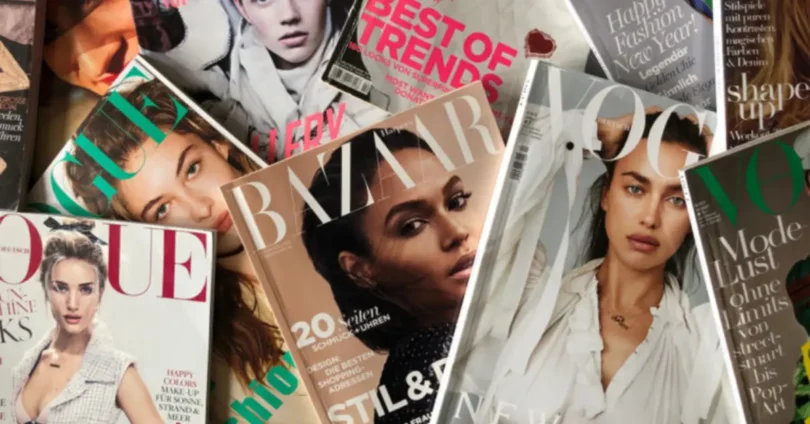
A magazine cover is the front page of a printed or digital magazine. It usually includes the magazine’s name, a main photograph or illustration, headlines, and information about featured stories.
Think of the cover as an introduction to your publication. Before readers open the magazine, they use its cover to decide whether the content looks interesting and relevant to them.
For example, a fashion magazine might feature a model wearing the latest seasonal trends, while a technology magazine might showcase a new smartphone or an innovative gadget.
A good magazine cover communicates the publication’s subject, style, and personality in just a few seconds.
Why Is a Magazine Cover Important?
A well-designed magazine cover does more than make a publication look attractive. It also helps build recognition and encourages readers to explore the content.
1. Creates a Strong First Impression
Readers often notice the cover before anything else. An appealing design can make your magazine look interesting, professional, and worth reading.
2. Attracts the Target Audience
Your cover should match the interests of your intended readers. For example, a travel magazine may use beautiful landscape photography, while a business magazine may focus on professional portraits and clean typography.
3. Builds Brand Identity
Using consistent colors, fonts, and logo placement helps readers recognize your magazine over time. A recognizable design can make your publication stand out from competitors.
4. Highlights Important Stories
The main headline tells readers what the featured story is about. Additional headlines can introduce other topics covered inside the magazine.
5. Supports Marketing and Promotion
A magazine cover can be shared on social media, websites, email newsletters, and online stores. An attractive design can help generate interest in both print and digital publications.
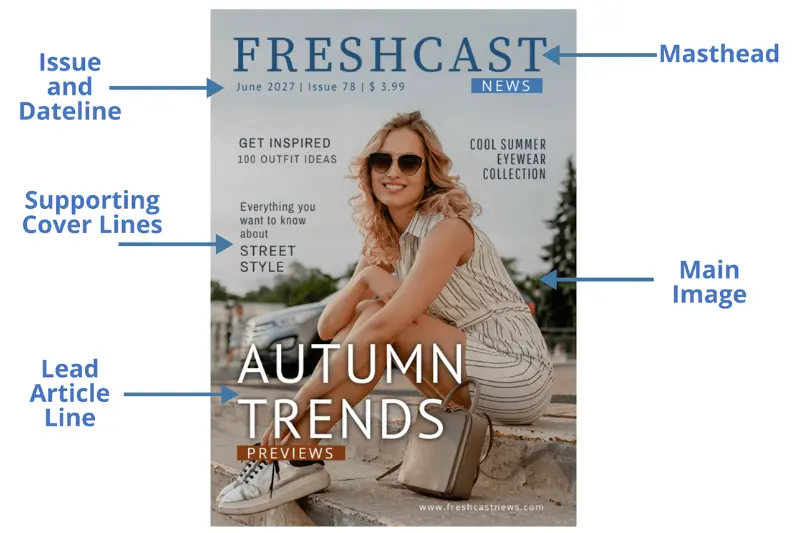
Main Elements of a Magazine Cover
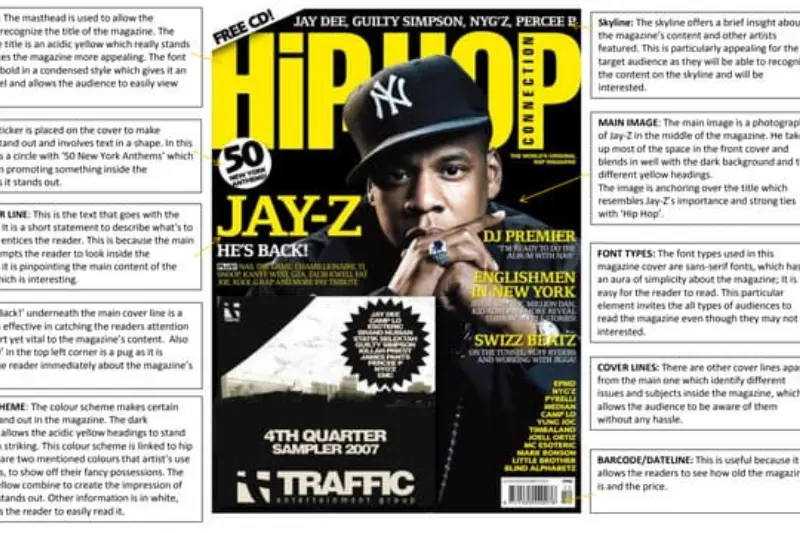
Before designing a cover, it helps to understand the elements that make it effective.
Magazine Title or Masthead
The masthead is the publication’s name, usually placed near the top of the cover. It should be clear, recognizable, and consistent with your brand.
Main Image
The main image is often the most visually prominent part of the design. It might be a photograph, illustration, product image, or creative graphic.
Choose an image that connects directly to your magazine’s subject.
Main Cover Line
The main cover line introduces the most important story in the issue. It should be short, engaging, and easy to read.
For example: “The Biggest Fashion Trends of the Season.”
Supporting Headlines
Supporting headlines highlight other articles that readers can find inside. Keep them concise so the cover does not look overcrowded.
Issue Date and Number
Many magazine covers include the publication date, volume, issue number, or season. These details help readers identify a specific edition.
Barcode or Price
Printed magazines sold commercially may include a barcode and price. Their placement depends on the publication’s layout and distribution requirements.
Colors and Typography
Colors and fonts influence the mood of the cover. Bold typography can create an energetic look, while simple fonts and neutral colors may communicate elegance and professionalism.
Popular Types of Magazine Covers
Different magazines use different cover styles depending on their audience and subject.
1. Fashion Magazine Cover
Fashion covers often feature models, designer clothing, beauty photography, and stylish typography. Strong visual composition and carefully selected colors help communicate current fashion trends.
2. Travel Magazine Cover
Travel covers usually showcase beautiful destinations, cultural experiences, beaches, mountains, or famous landmarks. Their purpose is to inspire readers to explore new places.
3. Technology Magazine Cover
Technology covers may feature electronic devices, artificial intelligence, digital innovation, or futuristic graphics. Modern typography and clean layouts are common choices.
4. Health and Lifestyle Magazine Cover
These covers often use calming colors, wellness photography, fitness images, and practical headlines about everyday life, nutrition, and personal well-being.
5. Business Magazine Cover
Business magazines commonly use professional portraits, company-related imagery, economic themes, and clear headlines about leadership, markets, and entrepreneurship.
6. Entertainment Magazine Cover
Entertainment covers focus on celebrities, films, television, music, and popular culture. They often use bold headlines and eye-catching designs to attract readers interested in the latest entertainment stories.
You may also like to read this:
Noodle Magazine Guide: Features, Website, and Safety Tips
Chandigarhmetro.com Magazine: Complete Reader’s Guide
Noodles Magazine: Everything You Need to Know
Nubia Magazine Vote 2025: Winners and Voting Guide
Yojana Magazine: Features, Benefits and Complete Guide
How to Design a Magazine Cover Step by Step
Creating an attractive magazine cover becomes easier when you follow a clear process.
Step 1: Choose Your Magazine Topic
Start by deciding what your magazine will cover. Is it about fashion, technology, food, travel, business, entertainment, or lifestyle?
Your topic will influence the images, fonts, colors, and headlines you choose.
Step 2: Understand Your Audience
Think about who will read your magazine. A cover designed for teenagers may use a different visual style from one intended for business professionals.
Consider your readers’ interests, age group, expectations, and preferred design style.
Step 3: Select a High-Quality Image
Choose an image that represents the main theme of your issue. Make sure the subject is clear and that the image has sufficient resolution for your intended format.
If you plan to publish the magazine commercially, use images you own, have licensed, or are otherwise permitted to use.
Step 4: Choose Fonts and Colors
Select fonts that are easy to read. A common approach is to use one distinctive font for the magazine title and another simple font for the headlines.
Choose a small color palette that complements your main image. Too many competing colors can make the design feel confusing.
Step 5: Arrange the Layout
Place the masthead where readers can identify it quickly. Position the main image prominently and organize the headlines around it.
Leave enough empty space between elements. A clean layout often looks more professional than a cover filled with text.
Step 6: Add Essential Details
Include the issue date, edition number, or other required information. For a printed magazine, check the barcode, trim, bleed, and print-resolution requirements before exporting the final file.
Step 7: Review the Final Design
View the cover as a small thumbnail. Check whether the title and main headline remain readable.
Correct spelling mistakes, inconsistent spacing, poor contrast, and crowded elements before publishing.
Best Tools for Creating a Magazine Cover
You can use several design tools to create a magazine cover, even if you have limited design experience.
| Tool | Best For |
| Canva | Beginners and ready-made templates |
| Adobe InDesign | Professional magazine layouts and print publishing |
| Adobe Photoshop | Photo editing and image-based cover designs |
| Adobe Illustrator | Custom graphics, illustrations, and typography |
| Affinity Publisher | Page layout and publication design |
If you are a beginner, Canva is a convenient starting point because it offers templates and simple editing features. For a publication with multiple pages and professional printing requirements, a dedicated page-layout tool may provide greater control.
Magazine Cover Design Ideas for Inspiration
If you are not sure where to begin, try one of these design approaches.
Minimalist Magazine Cover
Use a simple background, a clear title, one strong image, and only a few headlines. This style works well for luxury, architecture, lifestyle, and design publications.
Bold and Colorful Cover
Combine vibrant colors, large headlines, and expressive imagery. This approach can work for entertainment, youth culture, music, and pop-culture magazines.
Photography-Focused Cover
Let the main photograph do most of the work. Keep supporting text limited so the image remains the center of attention.
Editorial Typography Cover
Make typography the main visual feature. Large letters, creative alignment, and contrasting font sizes can give the cover a distinctive appearance.
Digital Magazine Cover
For an online publication, make sure the design looks good on both desktop and mobile screens. Keep the main title and central image visible when the cover is displayed as a small preview.
Common Magazine Cover Design Mistakes to Avoid
Even a good idea can lose its impact if the layout is poorly executed. Avoid these common mistakes:
- Using too many headlines: Too much text makes the cover difficult to scan.
- Choosing low-quality images: Blurry or pixelated images can make the publication look unprofessional.
- Using unreadable fonts: Decorative fonts should not make important information difficult to understand.
- Ignoring contrast: Text should stand out clearly against the background.
- Crowding the layout: Give the title, image, and headlines enough breathing room.
- Copying another magazine’s design: Take inspiration from other publications, but develop a distinctive identity.
- Ignoring the final format: A cover designed for social media may need different dimensions and adjustments from one intended for print.
Magazine Cover Design for Print vs. Digital
Although print and digital magazine covers share many design principles, there are a few important differences.
A print magazine cover needs to account for physical dimensions, bleed, trim areas, paper quality, and printing specifications. You should follow the printer’s requirements when exporting your design.
A digital magazine cover needs to remain clear on screens of different sizes. The title, image, and main headline should be easy to recognize in a small thumbnail or mobile preview.
If your magazine will be published in both formats, prepare versions for each platform rather than assuming that one file will work perfectly everywhere.
Frequently Asked Questions (FAQs)
1. What makes a good magazine cover?
A good magazine cover combines a recognizable title, a strong image, readable headlines, balanced colors, and a clean layout. It should communicate the magazine’s subject and attract the intended audience.
2. What should be included on a magazine cover?
Most magazine covers include the publication name, a main image, a primary headline, supporting cover lines, and issue information. Printed retail magazines may also need a barcode and price.
3. Can I create a magazine cover for free?
Yes. You can use free design tools and templates to create a magazine cover. Check the licensing terms for templates, fonts, and images, especially if you intend to sell your publication.
4. What size should a magazine cover be?
The correct size depends on the publication and printing method. A common US magazine trim size is approximately 8.5 × 11 inches, but many magazines use different dimensions. Digital covers can have different aspect ratios depending on the platform.
5. Which font is best for a magazine cover?
There is no single best font. Choose a typeface that suits your magazine’s identity and remains readable. Serif fonts can communicate tradition or elegance, while sans-serif fonts often create a modern appearance.
Conclusion
A magazine cover is an important part of a publication’s identity because it attracts attention, introduces the main stories, and gives readers a sense of what they can expect inside. You can create an effective cover by choosing a clear topic, understanding your audience, selecting a high-quality image, using readable typography, and keeping the layout balanced.
Whether you are designing a fashion magazine, a technology publication, or a digital lifestyle magazine, focus on making your cover attractive, easy to understand, and relevant to your readers. Start with a simple design, experiment with different layouts, and refine your work until it represents your publication’s unique style.