
A magazine cover page is the first thing readers notice when they pick up a magazine or view one online. It introduces the publication, highlights its most interesting stories, and encourages readers to explore the content inside. Whether you are creating a fashion magazine, lifestyle publication, business magazine, or digital edition, an attractive cover page can make a strong first impression. In this guide, you will learn about magazine cover pages, their essential elements, popular design styles, and tips for creating a professional look.
What Is a Magazine Cover Page?
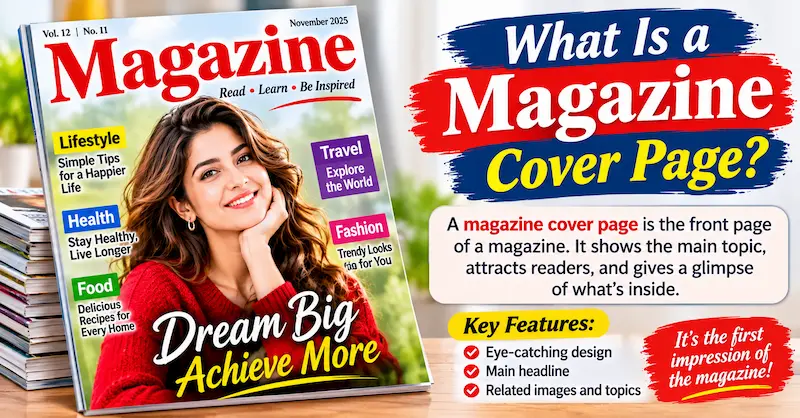
A magazine cover page is the front page of a magazine that displays its title, main image, headlines, publication date, and other important details. It gives readers a quick idea of what the magazine covers and what they can expect to find inside.
For example, a fashion magazine might feature a model wearing the latest clothing trends, while a technology magazine may showcase a new smartphone or an innovative gadget.
Think of the cover as an introduction to your magazine. It should communicate the publication’s personality, attract the target audience, and make people interested in reading more.
Why Is a Magazine Cover Page Important?
A well-designed magazine cover page does more than make a publication look attractive. It also supports branding, marketing, and reader engagement.
1. Creates a Strong First Impression
Readers often notice the cover before deciding whether to read a magazine. An appealing layout, high-quality image, and interesting headline can capture their attention immediately.
2. Builds Brand Identity
The magazine title, colors, typography, and design style help readers recognize the publication. Using a consistent appearance across different issues can strengthen brand recognition.
3. Highlights Important Stories
A magazine cover provides space to promote the most interesting articles inside. Headlines about current trends, interviews, useful advice, or popular topics can encourage readers to explore the magazine.
4. Attracts the Right Audience
Different magazines appeal to different readers. A lifestyle publication may use bright colors and friendly headlines, while a business magazine may prefer a clean and professional design.
Matching the cover to your audience makes the publication more appealing.
5. Supports Marketing and Sales
For printed magazines, an attractive cover can help a publication stand out on store shelves. For digital magazines, an appealing cover can encourage people to click when they discover it on websites, social media, or reading platforms.
Main Elements of a Magazine Cover Page
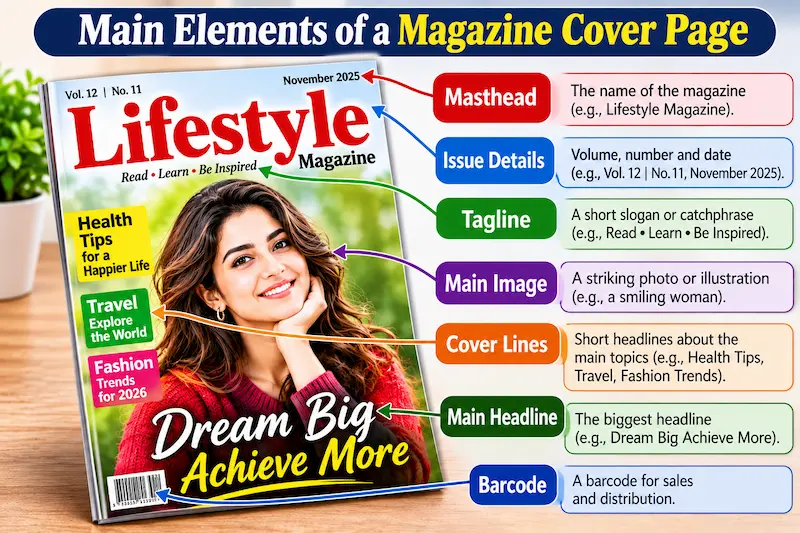
A successful magazine cover usually combines several essential elements. Each one should have a clear purpose and contribute to the overall design.
Magazine Title or Masthead
The masthead is the magazine’s main title or logo. It is commonly positioned near the top of the cover and uses recognizable typography.
A clear, memorable title helps readers identify the publication quickly.
Main Cover Image
The main image is often the most noticeable part of the cover. It could feature a person, product, landscape, illustration, or another visual related to the magazine’s topic.
Choose a high-quality image that supports the main theme and leaves enough space for the title and headlines.
Cover Headlines
Cover headlines tell readers about the main stories featured inside the magazine. They should be short, engaging, and easy to understand.
For example, a lifestyle magazine might include headlines such as:
- Simple Ways to Improve Your Daily Routine
- The Latest Fashion Trends to Try
- Expert Tips for a Healthier Lifestyle
- Ideas to Make Your Home More Beautiful
Avoid adding too many headlines, as excessive text can make the cover look crowded.
Issue Date and Number
Many magazines display the publication month, year, volume, or issue number. These details help readers identify a particular edition.
Barcode and Price
Printed magazines sold through retailers may include a barcode and price. These details are usually placed near the bottom or in a corner so they do not distract from the main design.
Colors and Typography
Colors and fonts influence the magazine’s overall appearance. Bold typography may suit entertainment publications, while elegant fonts might work well for fashion or luxury magazines.
Choose colors and fonts that complement each other and keep the text readable.
Popular Types of Magazine Cover Pages
Magazine cover designs vary depending on their subject, purpose, and target audience. Here are some popular types to consider.
1. Fashion Magazine Cover Page
Fashion magazine covers often feature models, designers, clothing collections, beauty photography, and seasonal trends. They may use elegant typography, striking portraits, and carefully selected colors.
This style is suitable for publications covering clothing, beauty, accessories, and personal style.
2. Lifestyle Magazine Cover Page
Lifestyle covers focus on everyday interests such as travel, home decoration, wellness, relationships, and personal development.
They often use inviting images and friendly headlines that appeal to a broad audience.
3. Business and Finance Magazine Cover Page
Business and finance magazines generally use professional photography, simple layouts, and confident typography. Their headlines may focus on market trends, entrepreneurship, investment, leadership, or economic developments.
A clean design can help communicate professionalism and credibility.
4. Technology Magazine Cover Page
Technology magazine covers may feature smartphones, computers, artificial intelligence, gaming, robotics, and other innovations.
Modern fonts, contrasting colors, and futuristic design elements can create an innovative appearance without making the layout difficult to read.
5. News Magazine Cover Page
News magazine covers often highlight important events, public issues, interviews, or developing stories. They usually prioritize a strong headline and a relevant image.
Accuracy is particularly important for news publications. Headlines and images should represent the story fairly and avoid misleading readers.
6. Digital Magazine Cover Page
Digital magazine covers are designed for websites, mobile apps, electronic publications, and social media. They should remain clear and attractive when displayed as small thumbnails.
A recognizable title, a strong main image, and a simple headline hierarchy can help a digital cover stand out online.
How to Design an Attractive Magazine Cover Page
You do not need to be a professional designer to create an appealing magazine cover. By following a few practical steps, you can develop a design that looks organized and professional.
Step 1: Understand Your Magazine’s Topic
Before choosing images or fonts, decide what your magazine is about. Is it focused on fashion, education, technology, travel, business, or entertainment?
Your topic will guide your design choices and help you select an appropriate visual style.
Step 2: Identify Your Target Audience
Think about who will read your magazine. Students, business professionals, fashion enthusiasts, and general readers may respond to different design styles.
Choose images, colors, and headlines that match the interests of your intended audience.
Step 3: Choose a Strong Main Image
Select an image that communicates the magazine’s main theme. Make sure it has good resolution, suitable lighting, and enough space for the title and cover lines.
Avoid images that are blurry, stretched, overcrowded, or unrelated to the content.
Step 4: Create a Clear Layout
Place the magazine title where readers can find it quickly. Position the main image prominently and arrange the cover headlines around it.
Leave enough empty space between elements. A cover does not need to be filled with text to look interesting.
Step 5: Select Suitable Fonts and Colors
Use a limited number of fonts and colors to maintain a consistent appearance. Make sure the text contrasts with the background so readers can understand it easily.
For example, dark text may work well on a light background, while white text may be more readable over a darker image.
Step 6: Add Publication Details
Include the issue date, edition number, website, price, or barcode when relevant. For digital publications, you may also include a short description or other useful identifying information.
Step 7: Review the Final Design
Before publishing, check the spelling, image quality, text alignment, margins, and readability. Preview the cover at its intended size, especially if it will appear as a small online thumbnail.
A few final adjustments can make the finished design look much more polished.
Best Tools for Creating a Magazine Cover Page
Several design tools can help beginners and experienced designers create magazine covers.
| Design tool | Best use |
| Canva | Beginner-friendly templates and quick designs |
| Adobe InDesign | Professional magazine and print layouts |
| Adobe Photoshop | Photo editing and image-based covers |
| Adobe Illustrator | Vector graphics, logos, and custom typography |
| Microsoft PowerPoint | Simple covers and basic layout experiments |
Your choice depends on your experience, budget, and project requirements. If you want to create a cover quickly, a template-based tool may be enough. If you are preparing a complete printed magazine, professional layout software can provide greater control over page dimensions and print settings.
Magazine Cover Page Size and Format
The correct size depends on whether you are creating a printed magazine or a digital publication.
For printed magazines, common formats include A4 and A5, although many publications use custom dimensions. Before designing, confirm the final page size with your printer.
For digital magazines, choose dimensions that suit the intended platform. A portrait layout is often suitable for magazine covers, while social media promotions may require additional square or landscape versions.
When preparing a print cover, remember to account for bleed, trim, safe margins, and the spine if the cover includes the back and spine of a bound magazine. Your printer can provide the exact specifications.
For digital use, export the design in a suitable image format, such as PNG or JPEG. For professional printing, a print-ready PDF is commonly used.
You may also like to read this:
Yojana Magazine: Features, Benefits and Complete Guide
Magazine Cover: Design Ideas, Types, and Tips
Vision IAS Monthly Magazine: Complete UPSC Guide
Nubia Magazine Vote 2026 Most Beautiful Woman
Sunday Magazine Guide: Stories, Entertainment and Lifestyle
Magazine Cover Page Design Tips for Beginners
If you are designing your first cover, keep these practical tips in mind:
- Keep the title readable: Your magazine name should be easy to recognize.
- Use high-quality images: Clear visuals help your publication look professional.
- Limit the number of headlines: Focus on the most valuable stories.
- Maintain visual balance: Make sure the image, text, and empty space work together.
- Choose consistent branding: Use a recognizable style across different issues.
- Check readability on mobile: Digital covers should remain clear on smaller screens.
- Avoid misleading headlines: The cover should accurately reflect the magazine’s content.
- Use images legally: Choose your own images, licensed photographs, or visuals you have permission to publish.
Remember, an effective cover is not necessarily the most complicated one. Sometimes, a simple layout with one excellent image and a strong title works better than a design crowded with unnecessary details.
Common Magazine Cover Page Mistakes to Avoid
Even a good design idea can lose its impact if the cover is poorly organized. Watch out for these common mistakes:
- Using too many fonts that do not match.
- Adding more headlines than the design can support.
- Choosing low-resolution or stretched images.
- Placing text over busy backgrounds without enough contrast.
- Making the magazine title too small.
- Ignoring spelling and grammar mistakes.
- Using inconsistent colors and branding across editions.
- Forgetting print margins or digital display requirements.
Taking time to review these details can improve the quality and readability of your final cover.
Conclusion
A magazine cover page is an essential part of any printed or digital publication because it introduces the magazine, establishes its identity, and encourages readers to explore its content. From choosing a strong main image to selecting readable typography and organizing cover headlines, every design decision contributes to the final result.
If you are a beginner, start with a simple layout and focus on your magazine’s purpose and audience. Use suitable design tools, maintain visual balance, and make sure every element serves a clear purpose. With practice, you can create a professional-looking magazine cover page that attracts attention and communicates your message effectively.
FAQs About Magazine Cover Page
1. What is a magazine cover page?
A magazine cover page is the front page of a magazine that displays its title, main image, headlines, publication date, and other important details. It introduces the magazine and attracts readers’ attention.
2. What should a magazine cover page include?
A magazine cover page typically includes the magazine title, a main image, cover headlines, issue date, and publication details. Printed magazines may also include a barcode and price.
3. Why is a magazine cover page important?
A magazine cover page creates a first impression, builds brand identity, highlights important stories, and encourages readers to explore the content inside.
4. How do you create an attractive magazine cover page?
To create an attractive magazine cover page, choose a high-quality image, use readable fonts, select suitable colors, organize headlines clearly, and maintain a balanced layout.
5. What are the different types of magazine cover pages?
Common types include fashion, lifestyle, business, finance, technology, news, entertainment, and digital magazine cover pages. Each type uses a design style that matches its subject and audience.